

NexusProbepy v0.1.0 Building PortScanner from Scratch
Why Python for Reconnaissance?
I am starting a series to build security tools from scratch . Here is the First up : Nexus Probe
Python is the swiss army knife for security experts and hackers lightweight , fast to write and has socket library which allow us to talk to each port
Working of the scanner
For developing the portscanner we will be using the TCP three way handshake . Its a very important step in connection setup in TCP Protocol between two systems .
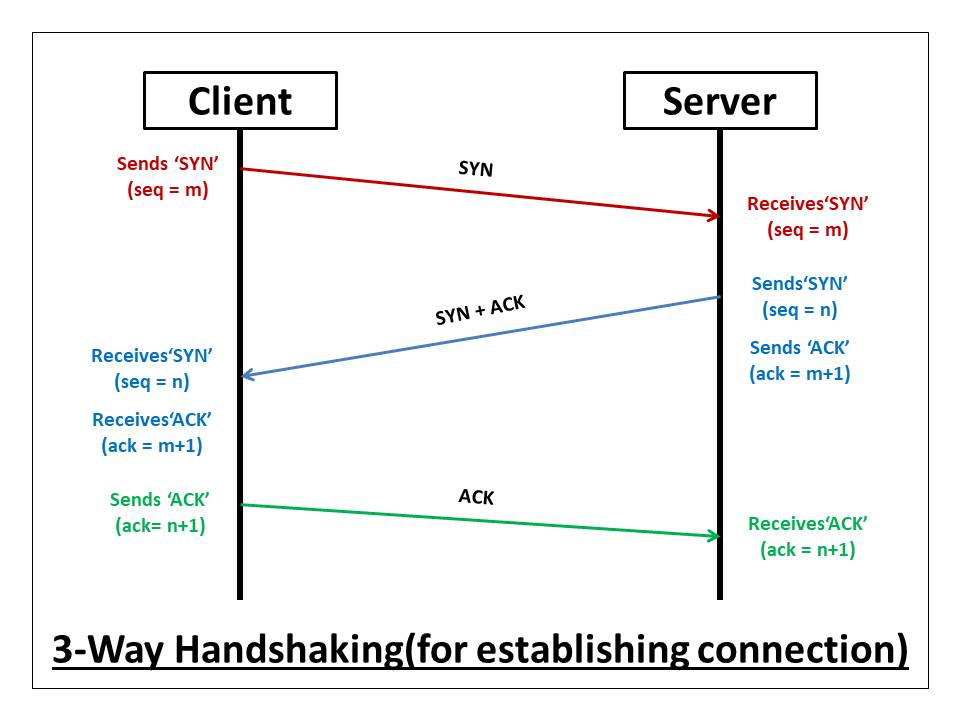
SYN , ACK and RST are important flags in TCP connection setup
In TCP handshake the client sends and SYN (synchronization flag ) to server (Target). The SYN flag initiates the connection and synchronizes starting sequence numbers between two devices
In response to SYN flag the target server responds with SYN+ACK flag which contains the server response to client connection initialization. The server sets ACK flag to client sequence number + 1 signaling its ready for next part for next stream
When the client receives SYN+ACK flag from target server it responds with a ACK flag ( target sequence number + 1) signalling that the connection setup if successful
Now if the connection is successful the the server will send SYN+ACK flag this can be used to confirm if a specific port is open
On the contrary if the port is closed the target will respond with RST flag which means reset the connection
If the response contains none of them it means the port is filtered
DIVING TO DEVELOP
For developing the port scanner in python we will be using socket built in library which allows systems to communicate with each other .
This initial version will implement simple scanner which check if port is open closed or filtered.
import socket
import subprocess


def is_online(host):
    """
    Check if the host is online by pinging it once.
    """
    response = subprocess.run(["ping", "-c", "1", host], capture_output=True, text=True)
    return response.returncode == 0


def main():
    host = "192.168.1.2"
    port = 22


    if not is_online(host):
                print(f"Host {host} is not online")
                exit(1)

    try:
        for port in range(1, 50):
            sock = socket.socket(socket.AF_INET, socket.SOCK_STREAM)

            sock.settimeout(1)


            result = sock.connect_ex((host, port))
            if result == 0:
                print(f"Port {port} is Open")
                sock.close()

            elif result == 111:
                print(f"Port {port} is Filtered")
                sock.close()

            else:
                print(f"Port {port} is Closed")
                sock.close()
    except KeyboardInterrupt as e:
        print("KeyboardInterrupt from user")
        print("Exiting...")
        exit(1)


    except socket.timeout as e:
        print(f"Error: {e}")
        exit(1)


if __name__ == "__main__":
    main()
These code has two functions currently
is_online
main
Is_online
The is_online function is executing the ping command to check if the host we are going to scan for open port is online so we dont waste time scanning ports for offline host
Here we make use of built in python library subprocess to run the os command ping and capture it output to a variable response and the response.returncode contains the exit code of command which tells if it was success or a failure
So in our case we compare the response.returncode with 0 so if the ping was success which means host is online and returncode will be 0 so comparing 0=0 will return true else if the return code is 1 it will return false
This boolean value is returned value of the function
main
Here in main function we currently statically pass values host and port . Moving to socket programming this line is base of entire socket programming in python
sock = socket.socket(socket.AF_INET, socket.SOCK_STREAM)
the sock.socket function is used to create a socket object with variable name sock
Here are two important parament passed to the socket funcion :
socket.AF_INET: This specifies the Address family. The address family specifies type of address or Network Layer protocol we are going to use to establish connection between two systems . According to our current code we are using INET ( IPV4 address) for communicationsocket.SOCK_STREAM: This tell about the Transport layer protocols we will be using to send message to specific system for communication . The sock.SOCK_STREAM will use the TCP (Transmission control Protcol) for delivery of the packets
The settimeout function of the sock object help us to set timeout for the response from the target server so if it take more that specified time to receive response from target server the that connection is aborted to increase speed of scanning ports
connect () and connect_ex () mystery
Now many of us at beginning that there are two function for connection in socket library so when is best time to use which
The connect function is simple when your are confident that connection will be establish and even if error occcurs its either connectionrefused errror or timeout error
The connect_ex function is the extended version of connect function .If there is any failure in execution it does direct stop the the execution instead it resturns u with a errror code
For example : if connection succcess the error code is zero else if connection fails the error code C error code is returned (eg : 111,10061)
This is best for portscanner project as it also can be used for banner grabbing which we will implement in future improvizations
For important programs like portscanner proper erro handling the following exception handlers we have here
KeyboardInterrupt : So if user want to exit the program and tries to force escape it (For eg : CTRL + C )
socket.timeout : If response from server take more time than the timeout set before the error is occured
The for loop implement to scan ports range . Current we are scanning first 50 ports .
Conclusion
Concluding initial work In next update we will implement command line argeument and Threads to receive input from arguement and run the program in multiple threads
Source code : GITHUB