
NexusProbe v0.2.0: Weaponizing Python with Multithreading & CLI Arguments

INTRODUCTION
The v0.1.0 we created in last post worked but its too slow to be used in real world scanning . Scanning a port range was like waiting for a government website to load .
Also in previous version we passed the target value in static code . So if we wanted to change a target we would need to edit the target in code and then run the program .
ARCHITECTURE
As we move forward with adding features to the scanner and fixing different issues the size of code goes on increasing . If this code is not managed properly can cause mess at time of debugging and adding updates to the code. So we will divide the code into modules so if any error occurs we can easily detect which code exactly is causing the error
To modularize the code I will be following folder structure
├── main.py                        #entrypoint
├── nexusprobe                     # main package
│   ├── cli.py                     # CLI Argument parser
│   ├── engine.py                  # Threadpoool logic
│   ├── __init__.py                # Metadata & exports
│   └── scanner.py                 #Scanner logic
└── README.md
cli.py : This file will contain code that will allow us to to parse command line argument while running the code for eg ip address, port , port range , etc
engine.py : This file will contain code to run ur scanner concurrently making the scanning of large amount of ports faster
scanner.py : This is main part of ur code which we implemented previously for scanning for ports but with threading
ENGINE
The engine is the brain of our scanner which will make our program multi threaded so the ports are scanned faster . In this engine we will be implementing Threadpool for carrying out threading in port scanner
What 's Threadpool ?
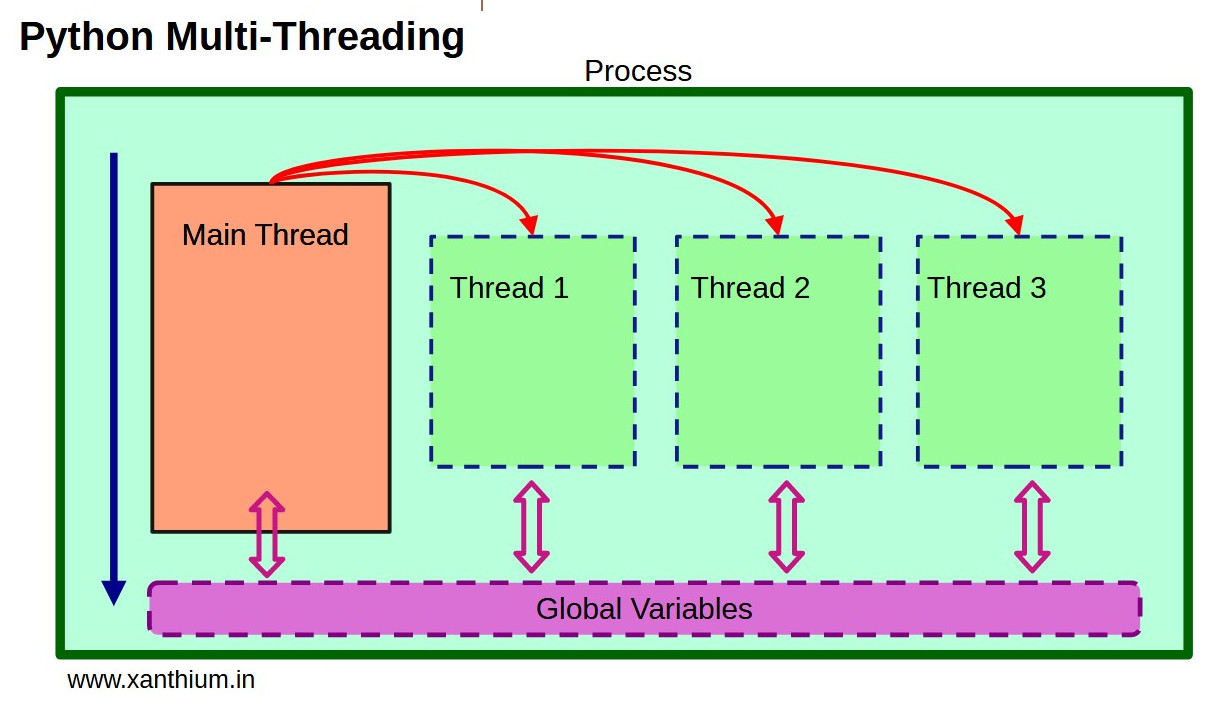
In Multi threading when a task is created a new thread is created for that task and when task assigned is completed the thread is removed or deleted .The process of creating new threads costs time and cpu resources . Making it more time consuming .
Learning from a real life example
Consider Situation you want to distribute Party invitation cards to 10 different people u will ask help from 10 friends (10 threads) to each visit 1 person give the card and return to their home (thread destroyed ) . This way you will need to everytime find a friend explain him the task and route and then he performs it and returns to his home . For 100 people we will require to ask help from 10 friends .This is total wastage of time and resources
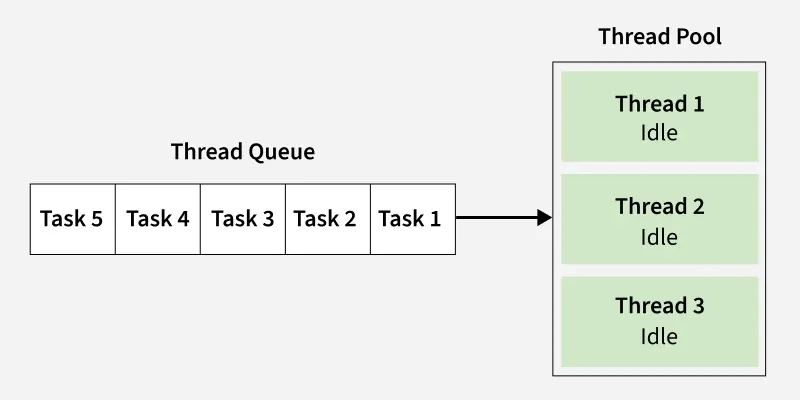
Where as in Threadpool a given group of threads (Pool) are created beforehand and when a task enters the system a thread is assigned to task and when its execution is completed the thread returns back to pool instead of getting destroyed . This saves the time of again and again creating new threads saving time and cpu resources
Solving above example with threadpool
In a threadpool , instead of asking help from 10 friend for distributing cards to 10 people we will ask help from 2 friends (2 threads) only and each of them take 1 card visit the person give the card and instead of returning home come back and check for more cards to be delivered (tasks to be implemented) and deliver then and when all cards are distributed then the friends return to their home (threads destroyed) . This saves time required for creating new threads
CLI WEAPONIZATION
In this version we are updating the method of accepting input from user. Instead hardcoding target ip to the source code we are allowing user to pass the input from command line with help of flags like we see in other terminal based programs like
python3 main.py  --help
python3 main.py -t 192.168.1.1
DIVING TO CODE
As we have modulated our code into multiples modules making our code clean
nexusprobe/cli.py :
import argparse

from . import __version__


def receive_args():
    parser = argparse.ArgumentParser(
        prog="nexusprobepy", description="Nexus ProbePy CLI", epilog="nexusporbepy"
    )
    parser.add_argument("-t", "--target", help="Target IP address or hostname")
    parser.add_argument("-p", "--port", help="Target port number")
    parser.add_argument("-a", "--all", action="store_true", help="Scan all ports")
    parser.add_argument("-r", "--range", help="Port range to scan")
    parser.add_argument(
        "-v", "--version", action="version", version=f"%(prog)s {__version__}"
    )
    args = parser.parse_args()

    if not args.target:
        parser.error("Target is required")
    return args


if __name__ == "__main__":
    args = receive_args()
This code allows to accept cli args from user
--target: This argument is used to pass target ip to the program for scanning--port: To carry out single port scan on specified ip--range: To carry port scan on specified range--all: The action property store_value value is used to specify that if -a flag specified that means the flag is true and no external value for -a flag need to be passed by user . We are using this in condition wants to scan all 65536 ports
Note : There are total 65536 ports in every system which can be used by applications to carry out their network communication .
--version: This is to allow user to check current version of scanner . The%sign in f string of version property is the placeholder for the program name only in argparse context ,{prog}is the program name we are assigning to prog when creating parser for cli argument in same file in below line
parser = argparse.ArgumentParser(
       prog="nexusprobepy", description="Nexus ProbePy CLI", epilog="nexusporbepy"
__version__ contains version number of scanning which we will assign in __init__.py
Here the
--targetargument value is compulsory required even when -a value used
For cli arguments we are using argparse a built in library in python for accept inputs as flags from command line
a parser is created using the argparse.ArgumentParser() to define the argument flags
nexusprobe/scanner.py
import errno
import socket
import subprocess


def is_online(host):
    """
    Check if the host is online by pinging it once.
    """
    response = subprocess.run(["ping", "-c", "1", host], capture_output=True, text=True)
    return response.returncode == 0


def scan_port(task):
    host, port = task

    try:
        # print(f"Scanning {host}:{port}")
        # print(f"[ + ] Scanning {host}")
        sock = socket.socket(socket.AF_INET, socket.SOCK_STREAM)

        sock.settimeout(1.5)

        result = sock.connect_ex((host, int(port)))

        if result == 0:
            data = sock.recv(1024)
            print("|           |              |")
            print(f"| {port}        |       Open   |")
            print("|___________|______________|")
            if not data:
                sock.close()
            sock.close()

        elif result in (errno.EAGAIN, errno.EALREADY, 115):
            print(f" {port}         |  Filtered")
            sock.close()

        elif result == errno.ECONNREFUSED:
            # print(f" {port}          |  Closed")
            sock.close()
    except KeyboardInterrupt as e:
        print("KeyboardInterrupt from user")
        print("Exiting...")
        exit(1)

    except socket.gaierror as e:
        print(f"Error: {e}")
        exit(1)

    except socket.timeout as e:
        print(f"Error:{port} {e}")
        exit(1)
This our scanner code with some extra exception handling. Instead of code based hamdling we are preferring accepting error based exception handling for proper detection like if the port is filtered or closed
with exception handlers like errno.EAGAIN, errno.EALREADY ,ECONNREFUSED
ECONNREFUSED : This clearly defines that the target system port refused for connection
errno.EAGAIN : This error is received from non blocking sockets .so if there is more time required two get response data from target system which we requested with use of data.recv(1024)
errno.EALREADY : This exception tells that previous request to the target is currently in process and hence u should wait to make request to same port
nexusprobe/engine.py
import concurrent.futures
import time


from .cli import receive_args
from .scanner import is_online, scan_port

# -p  single port
# -r range of user defined ports


def run_engine():
    args = receive_args()
    # print(f"Scanning {args}")
    if not is_online(args.target):
        print(f"[ - ] Host {args.target} is not online")
        exit(0)

    # if not args.port and not args.range:

    if args.port:
        portargs = args.port.split(",")

        print(f"\n [ + ] Scanning {args.target} \n")
        tasks = [(args.target, port) for port in portargs]

        #        print(f"Port       |       status ")
        print(f"| Port      |       status |")
        print("|___________|______________|")

        with concurrent.futures.ThreadPoolExecutor() as executor:
            executor.map(scan_port, tasks)
    elif args.range:
        print(f"\n [ + ] Scanning {args.target} \n")
        start_port = int(args.range.split("-")[0])
        end_port = int(args.range.split("-")[1])
        if start_port > end_port:
            print(f"[ - ] Invalid range: {args.range}")
            return
        ports_range = range(start_port, end_port + 1)
        # print(ports_range)
        tasks = [(args.target, int(p)) for p in ports_range]

        #        print(f"Port       |       status ")
        print(f"| Port      |       status |")
        print("|___________|______________|")

        with concurrent.futures.ThreadPoolExecutor() as executor:
            executor.map(scan_port, tasks)
    elif args.all:
        print(f"\n [ + ] Scanning {args.target} \n")
        ports_range = range(1, 65536)
        tasks = [(args.target, p) for p in ports_range]
        print(f"|Port       |       status |")
        print("|___________|______________|")
        with concurrent.futures.ThreadPoolExecutor() as executor:
            # print(f"Scanning {args} : {tasks}")
            executor.map(scan_port, tasks)

    else:
        print(f"\n [ + ] Scanning {args.target} \n")
        ports_range = [
            21,
            22,
            23,
            25,
            53,
            80,
            110,
            139,
            143,
            443,
            445,
            465,
            587,
            993,
            995,
            1433,
            3306,
            3389,
            5432,
            6379,
            8080,
            8443,
            5000,
            5001,
            8088,
            17000,
            17001,
            25565,
            27015,
        ]
        tasks = [(args.target, p) for p in ports_range]

        #        print(f"Port       |       status ")
        print(f"| Port      |       status |")
        print("|___________|______________|")

        with concurrent.futures.ThreadPoolExecutor() as executor:
            executor.map(scan_port, tasks)


if __name__ == "__main__":
    run_engine()
This file carries code for executing our scanner using threadpool to make it faster scan
We are implementing four conditions:
if not is_online:This condtion checks output of
is_onlinefunction to confirm if specified ip is online in network and prevent scanning for ports of offline deviceif args.port:This condition is used when user wants to scan a single piort open or closed. or user can pass multiple ports seperted by comma
,eg :#SINGLE PORT python3 main -t 192.168.1.10 -p 22 #MULTIPLE PORTS python3 main.py -t 192.168.1.10 -p 22,23if args.range:
This condition can be used when user wants to scan a range of ports where two ports one starting port and second end port is passed by the user
eg:
#this scan port from 10-30
python3 main.py -r 10-30
elif args.all:In this condition we perform scan on complete 65536 ports of a system . eg :
python3 main.py -a
nexusprobe/__init__.py
__version__ = "0.2.0"
__author__ = "codedloki"


from .cli import receive_args
from .engine import run_engine
from .scanner import scan_port
This code is to transform your code folder into a python package . By using this you can keep ur code clean by tranforming ur imports from
from nexusprobe.engine import run_engine
from nexusprobe.cli import receive_args
to
from nexusprobe import run_engine,receive_args
The __version__ and __author__ are like properties to our scanner so after we create executable for our scanner the user can simply run command nexusprobepy.__version__ to get current version to check if they are using updated scanner
main.py
from nexusprobe import run_engine


def main():
    run_engine()


if __name__ == "__main__":
    main()
The main.py file imports and calls the run_engine function we have created in nexusprobe/engine.py file
CONCLUSION
Its time to wrap up v0.2.0 with solving the speed problem of code with Threadpool and modularizing code into seperated modules so its easier for us to make updates to the code in future
We are not gonna stop here . Ofcourse this version is blazing fast but yet it just tells if the port is open or closed . And as developer or a cybersecurity enthusiasist its very little info
in next version we will be implementing service detection , Saving the output and showing progress of scan live
Source Code : v0.2.0